AI Automation Specialist for Founders & Growing Agencies

I build the systems
that free founders
from their business.

If your agency is still onboarding clients by hand, chasing invoices by email, and managing leads from a spreadsheet: those aren't minor inefficiencies. They're the ceiling on your growth. I build the automation systems that remove them, so your team works on clients instead of admin.

22h
Returned
per week
6 days
To pay
for itself
0 hrs
Manual work
post-build
Lynet Mwikali, AI Automation Specialist
Built for
Agencies · 5–20 people Founders scaling past their first hires Service businesses still running on manual Teams ready to stop doing admin by hand
This saved us a week every month in onboarding admin alone. I genuinely didn't believe it until I watched it run live in front of me.
Marketing Director · 7-person UK Digital Agency · Client Onboarding Project
I used to dread onboarding new clients. Now my team doesn't even know when a new one comes in until they check Notion. It just happens.
Sarah M., Founder · 5-person Brand Consultancy, London · Onboarding + CRM Automation
We were losing hours every week on admin that nobody was tracking or costing. The audit alone surfaced that. We had no idea how much we were losing until we saw it mapped out.
Operations Lead · 9-person Creative Studio, Manchester · Process Audit + Workflow Build
Within 30 days it had returned the investment three times over in time saved. I keep recommending it to every founder I know who's still doing things manually.
Caleb B., CEO · 8-person Digital Services Agency, Dublin · Lead Qualification + Onboarding
All feedback collected at project completion · Names withheld at client request
Not sure where to start?
Take the free 7-Minute Process Audit.

7 minutes. No sign-up. You'll get a clear readiness score and your top 3 automation wins, whether you work with me or not.

Take the audit →
Free · No sign-up required
What I Do

Services built for operators.

Click any service to see exactly what's included, the tools I use, and what you walk away with.

🔍
7-Minute Process Audit
Maps every manual task in your business and scores your automation readiness. The right starting point before building anything. It's free.
Take the audit now →
See what's included
Includes
  • Automation readiness score
  • Priority task map
  • Top 3 quick wins identified
  • Personalised results report
Format
  • 7 minutes to complete
  • No sign-up required
  • Instant results
  • Free, no obligation
7 minutes
Free
"You'll know exactly which process to automate first and what it will return. Before spending a penny."
🚀
Client Onboarding Automation
The moment a client signs up, the entire sequence fires: welcome email, CRM entry, Drive folder, Slack alert and Notion project card. All in under 10 seconds.
See the case study →
Scope this project →
See what's included
Includes
  • Personalised welcome email + booking link
  • Google Sheets CRM row, auto-dated
  • Google Drive folder with subfolders
  • Slack team notification
  • Notion project tracker entry
  • Duplicate detection + error handlers
Tools
  • Make.com
  • Tally / Typeform
  • Zoho Mail / Gmail
  • Google Drive + Sheets
  • Slack + Notion
  • Calendly
1–2 weeks
Most requested
"A new client signs up. Before you look up from your desk, they've been welcomed, logged, and your team has been briefed."
See the case study →
🎯
Lead Qualification System
Scores and qualifies every inbound lead automatically, routing high-intent prospects straight to your calendar and low-intent ones into a nurture sequence.
Scope this project →
See what's included
Includes
  • Lead scoring logic by response
  • Intent-based routing rules
  • Personalised reply by score tier
  • Calendar booking for qualified leads
  • CRM logging on all submissions
  • Nurture sequence for non-qualified
Tools
  • Make.com
  • Typeform / Tally
  • HubSpot / Airtable
  • Calendly
  • Gmail / Zoho Mail
1–2 weeks
High ROI
"Every lead scored and routed in under 60 seconds. You only spend time on the ones worth your time."
💰
Invoice & Payment Follow-Up
Automated payment reminders that go out on schedule. You never have to manually chase a client or feel awkward about your own money again.
Scope this project →
See what's included
Includes
  • Due-date trigger reminders
  • Escalating follow-up sequence
  • Overdue alert to founder
  • CRM status update on payment
  • Confirmation email on receipt
Tools
  • Make.com
  • Xero / QuickBooks / Stripe
  • Gmail / Zoho Mail
  • Google Sheets
  • Slack
1–2 weeks
"The money conversation happens automatically, professionally and on time. Every time."
🗃️
CRM Auto-Update System
Pulls data from forms, emails, calendars and other tools and writes it to the right CRM record automatically. Your database stays current without anyone touching it.
Scope this project →
See what's included
Includes
  • Multi-source data ingestion
  • Field mapping and standardisation
  • Duplicate detection
  • Status updates from external triggers
  • Error logging and alerts
Tools
  • Make.com
  • HubSpot / Airtable / Notion
  • Gmail / Typeform / Calendly
  • Google Sheets
  • Webhooks
1–2 weeks
"Your CRM updates itself. No copy-pasting, no manual entry, no stale records."
📅
Appointment Booking & Reminders
A complete booking-to-confirmation system. Handles scheduling, confirmations, reminders and post-appointment follow-up without you touching any of it.
Scope this project →
See what's included
Includes
  • Calendar booking integration
  • Automated confirmation email
  • 24hr and 1hr reminders
  • No-show follow-up sequence
  • Post-appointment survey trigger
Tools
  • Make.com
  • Calendly / Acuity
  • Gmail / Zoho Mail
  • Google Sheets
  • Slack
1–2 weeks
"No-show rates drop. Your calendar fills itself and clients arrive prepared."
✉️
Cold Email Personalisation System
Personalised outreach at scale. Prospect research pulled automatically, copy written per lead, sent and tracked. Each email reads like it was written specifically for that person.
Scope this project →
See what's included
Includes
  • Prospect research automation
  • Personalised copy generation per lead
  • Send scheduling and tracking
  • Reply detection and routing
  • CRM logging
Tools
  • Make.com
  • OpenAI API
  • Apollo / Hunter.io
  • Gmail API / Instantly
  • Google Sheets
1–2 weeks
"Outreach that reads like you wrote it personally. Because each one is written specifically for them."
♻️
Content Repurposing & Distribution
One piece of content becomes many. Blog posts, podcasts and videos are automatically broken down, reformatted and distributed across platforms without anyone touching a scheduler.
Scope this project →
See what's included
Includes
  • Content ingestion pipeline
  • Format conversion per platform
  • Automated caption writing
  • Multi-platform scheduling
  • Analytics capture per post
Tools
  • Make.com
  • OpenAI API
  • Buffer / Later
  • Notion / Google Sheets
  • Webhooks
1–2 weeks
"Write once. Distribute everywhere. Consistently, without scheduling a single post manually."
About Lynet

The thing nobody tells you about building a business.

Nobody warns you that building a business means carrying it with you everywhere. Not in the pitch decks. Not in the founder stories. The version they sell you is the freedom, the leverage, the scale. They don't show you the Sunday evening where you can't fully switch off because you're not 100% sure that client email went out. You can be on a beach and still be there. Mentally checking, second-guessing, remembering. That's what manual operations actually cost. Not time. Presence.

I'm Lynet Mwikali. I'm an AI Automation Specialist who builds the systems that free founders and agency operators from the daily mechanics of their own business. I've lived the chaos of an operation that runs on memory and manual effort, and I've seen what happens when you replace that with systems that run without you. The work covers everything that currently lives on someone's to-do list: client onboarding, lead handling, follow-up sequences, invoice chasing, internal workflows. Whatever is running on founder memory gets replaced with something that runs without either of us.

Connect on LinkedIn → Work with me →
Live Automation Canvas

See the system running.

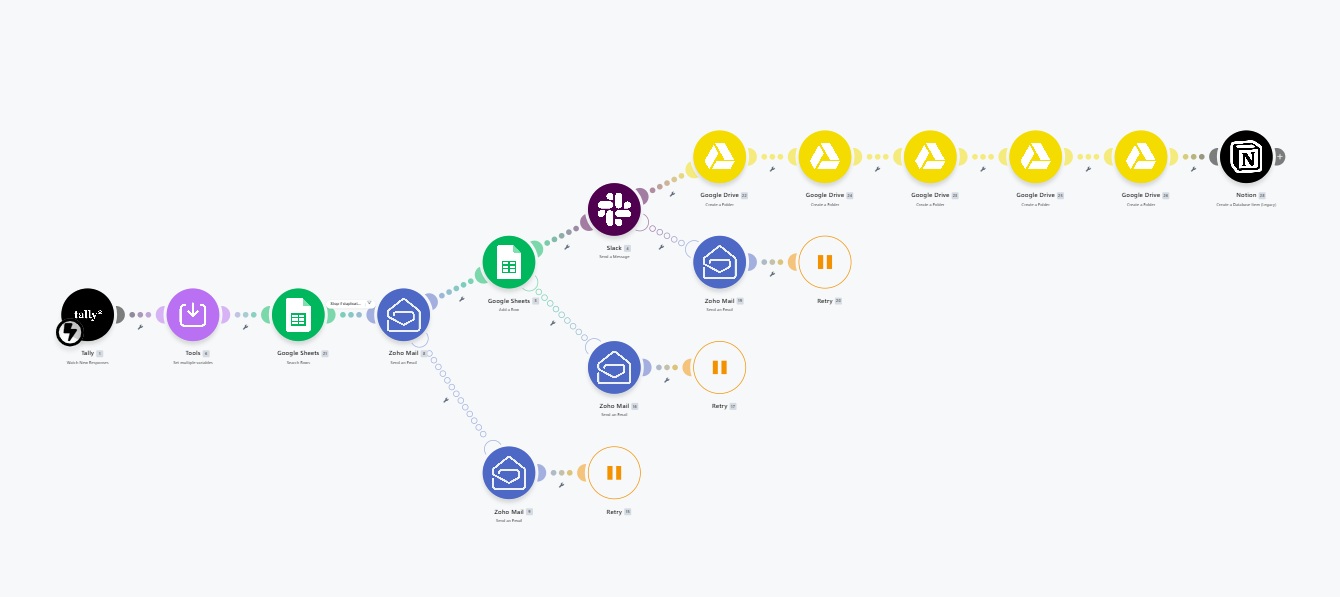
A real build, live in Make.com. Not a mockup. Below is the automation canvas for the Client Onboarding Automation System, with a full technical deep dive further down the page.

Case Study 01 · Client Onboarding Automation System · Make.com
Blueprint Ready
Make.com automation canvas — Client Onboarding Automation System

Save make-screenshot-cs1.jpg to this folder
to display your live Make.com build

01 Client submits intake form → webhook fires instantly
02 Duplicate email check, stops double-processing
03 Personalised welcome email + Calendly link delivered
04 CRM row created, Drive folder built, Slack team alerted
05 Notion project tracker updated. All in under 10 seconds.
View live scenario →
The Numbers

3 to 4 hours of onboarding admin, down to 10 seconds.

This is a system I designed and built as a deployable blueprint. The problem it solves is one I've mapped across service businesses handling 8–10+ clients per month.

A UK agency was spending 3 to 4 hours manually onboarding every new client. With 8 to 10 new clients per month, that was 40 hours of admin producing zero revenue. This system replaces every manual step. Permanently.

10s
Full sequence
fires
40hrs
Admin eliminated
per month
27
Modules
built
0
Manual steps
remaining
Watch the Build
Onboarding System Walkthrough
Full build · Make.com · 27 modules
Live System Demo
Live execution · Make.com · Full sequence
Case Study 01 · Blueprint Build · Deployable for Coaching & Service Businesses

How the onboarding system actually works.

The canvas above shows what it looks like. This section covers why it was built, what problem it solved, and exactly what fires when a client submits their intake form. From the first webhook to the last Notion entry.

10s
Sequence Time
From form submitted to every output delivered
40h
Monthly Admin Cut
Based on 10 clients/month at 4hrs onboarding each
0
Manual Input
Entire sequence runs without human intervention
5
Systems Updated
Email, CRM, Drive, Slack and Notion. Simultaneously.
The Problem
Every new client was costing the agency 4 hours of unpaid admin before work even started.

Welcome email written manually. Client folder created by hand. Team notified via a Slack message typed out each time. CRM updated manually. Notion page created from scratch. For every single client.

With 8 to 10 new clients per month, the founder was losing a full working week every month to tasks that produced zero revenue and zero value for the client.

What Was Built
Trigger
Client submits intake form
Tally webhook fires instantly. Duplicate check runs first. If the email already exists in the CRM, the scenario stops. No double-processing.
What fires automatically
5 systems updated in parallel
▸ Personalised welcome email sent with their name, package and a direct link to book their kickoff call
▸ A new row is added to the client CRM spreadsheet, standardised, auto-dated and status set to New
▸ A dedicated folder is created in Google Drive named after the client, containing separate folders for Contracts, Deliverables, Assets and Reports
▸ A Slack message is sent to the team with the client's full details
▸ A new project entry is created in Notion with all client details and a direct link to their Google Drive folder
Error Handling
Nothing goes unnoticed
If any module fails, an immediate alert is sent to the builder's inbox with the exact error and a step-by-step resolution checklist. Failed executions are saved and can be reprocessed once fixed. No client data is ever lost.
"Your onboarding process is the first thing a paying client experiences after they trust you with their money. If it's slow, manual, or inconsistent, they notice. They don't say anything. They just start wondering if the rest of your operation runs the same way."
The insight behind this build
The Result
Every new client fully onboarded, welcomed and tracked before the founder closes their laptop.

What previously took 3 to 4 hours of manual work now takes 10 seconds. The team is notified, the client is welcomed, and the project is already set up. Zero human involvement.

Every client gets the same consistent, professional onboarding experience regardless of how busy the team is that day.

Tools Used
Make.com Tally Zoho Mail Google Sheets Google Drive Slack Notion Calendly Webhooks
Modules Built
27 modules
Monthly Cost
Under £30
Status
Blueprint ready
Error Coverage
Full coverage, all modules
Case Study 02
Case Study 02 · Built for This Business · Now Deployed for Clients

From audit submission to
personalised response. Under 60 seconds.

This is the system that runs my own lead pipeline. I built it because I was losing leads to slow manual follow-up. It solved the problem completely. It now serves as the blueprint I deploy for clients running similar service or advisory businesses.

<60s
Response Time
Audit submission to email in prospect's inbox
0
Manual Input
Entire sequence runs without human intervention
2
Emails Deployed
Personalised report to prospect + brief to founder
14
Data Points
Captured per submission and logged to CRM automatically
The Problem
A high-intent lead filling in an audit form is the highest-value moment in the pipeline. I was manually wasting it.

Every time a prospect completed my audit, I was notified by email. I'd read the responses, manually compose a personalised reply, and send it when I had time. In practice, that meant 24 to 48 hours. Sometimes longer.

By the time the response landed, the prospect had moved on mentally. The moment of highest intent had passed. I built this system to fix that. It did.

What Was Built
Trigger
Instant webhook capture
Fires the moment the audit form is submitted. All 14 data points are passed downstream in real time.
Intelligence Layer
Router splits into two parallel paths
One personalised report to the prospect. One intelligence brief to the founder. Both in under 60 seconds.
CRM Logging
Every lead logged automatically
All 14 data points written to Google Sheets on every submission. No manual entry. No data lost.
"You didn't start a business to spend your Fridays updating spreadsheets and typing welcome emails. But that's exactly where the hours go, on work that doesn't move the needle, doesn't impress clients, and doesn't appear on any list of wins. The system should handle the routine so you can handle the exceptional."
The insight behind this build
Make.com · Business Process Audit Pipeline · Full Scenario
Live
Make.com — Business Process Audit Pipeline
01 Audit submitted → webhook fires instantly
02 Router splits into two parallel paths
03 Personalised results email → prospect inbox
04 Intelligence brief → founder
05 All 14 data points logged → Google Sheets
06 Total time: under 60 seconds
Audit Pipeline Walkthrough
Make.com canvas · Scenario explained
Pipeline Running Live
Live execution · Full sequence · End to end
The Result
Every lead acknowledged, diagnosed and followed up before the founder opens their laptop.

The window between high intent and cold lead, previously 24 to 48 hours, is now under 60 seconds. The system has been running since launch without modification.

What was a leaking pipeline is now a documented, structured, self-running lead system.

Tools Used
Make.com Webhooks Gmail API Google Sheets HTML Email Custom Scoring Logic
Build Time
One weekend
Monthly Cost
Under £12
Status
Running live
Maintenance
Zero
The Business Case

What does this actually return?

Founders ask the right question. Not "what does it cost?" but "what does it return?" Here's how to think about it.

Time recovered
40 hrs

That's a full working week returned to the founder every month. Permanently. Time that can go into sales, delivery, or simply not working evenings.

Based on 10 clients/month × 4hrs manual onboarding each
Revenue retained
Real

A delayed or poorly executed onboarding loses clients. Every client retained because their first 10 seconds were professional and seamless is revenue protected before a single delivery call happens.

First client retained after a seamless onboarding experience
Payback period
< 30 days

The build investment recovered in the first month from time saved alone, before counting the value of a professional first impression or the team hours no longer spent on manual setup.

Based on agency billing rate and 10 clients/month
The question isn't whether you can afford to automate this. It's whether you can afford not to.

Every month without this system is another month of a founder doing thousands in admin for free.

The Process

What working together looks like.

Three stages. No ambiguity about what you're buying into.

01
Step one
Audit

We start with the 7-Minute Process Audit. It maps every manual task costing you time and surfaces the highest-ROI automation to tackle first. This is free and takes 7 minutes.

Take the audit →
02
Step two
Build

I scope the project, build the automation, test it against real scenarios, and document everything. You're kept in the loop throughout. Most builds are complete in 1–2 weeks.

Watch the build →
03
Step three
Handover

You receive a fully documented system, a walkthrough video, and a handover call. You own it completely. It runs without you. And without me.

Start with the audit →

Not sure which build is right for you? The audit takes 7 minutes and tells you exactly where to start.

Take the free audit →
Let's Talk About Your Project

Start a project.

No long email chains. Tell me what you're building. I'll come back within 24 hours with a clear scope and a timeline.

Received.

I'll review your project and come back within 24 hours.
Check your inbox, including spam.

No pitch. No hard sell. Just a clear scope back within 24 hours.